H3A Health Analytics
Pre-Surgical Assessment Platform - 2018-2020
01 Design Philosophy
This project taught me that accessibility isn't a feature you add at the end. It's the reason the product exists. The patients who most needed careful pre-surgical assessment were the ones least able to participate in it. Every design decision started from that reality.
A note on confidentiality. This project was completed under NDA. I'm unable to show all production screens, patient-facing UI, or proprietary clinical workflows. What follows includes select platform views alongside a detailed account of my design process, decision-making, and measurable outcomes. I'm happy to walk through additional detail in a conversation. If you'd like to see the depth of my interface work, the Walgreens and Skyello case studies include full production screens.
Recruiter TL;DR - 30 seconds11 min read
02 The Problem
Before surgery, anesthesiologists need specific information: allergies, current medications, pre-existing conditions, reactions to prior anesthesia. The standard process was a phone call. But that process excluded the patients who needed the most careful assessment.
Patients who couldn't speak couldn't complete the call. Patients with cognitive impairments couldn't process rapid-fire clinical questions. Patients with motor impairments could talk but couldn't type - making digital forms useless. Patients who didn't speak English fluently couldn't navigate either channel. Elderly, homebound, or assisted care patients couldn't show up for in-person pre-op visits.
The gap was clear: patients who most needed careful pre-surgical assessment were least able to participate in it. Clinical teams compensated at point of arrival - more time in pre-op, more questions under pressure, more decisions with incomplete information.
The Gap
What Anesthesiologists Need
Phone Calls + Paper Forms
Broken bridge
Patient Populations Excluded
The patients who most needed careful pre-surgical assessment were the ones least able to participate in it.
The Prior State - How Pre-Surgical Assessment Worked Before H3A
Surgery Scheduled
Patient is booked for a procedure. The anesthesiologist needs a pre-surgical assessment completed before the day of surgery. A clinical team member is assigned to collect the data.
Phone Call Attempt
A staff member calls the patient to walk through assessment questions: allergies, medications, prior surgeries, anesthesia reactions. The call is the only remote option. No alternative channels exist.
Paper Form Fallback
If the call fails, a paper form is mailed or given at a pre-op visit. The patient fills it out by hand (if they can), mails it back (if they remember), and someone manually enters the data (if it's legible).
No Assessment Completed
For patients who couldn't complete either channel, the assessment simply didn't happen. No data was collected. The clinical team moved forward without it.
Day of Surgery - Scramble
Patient arrives. The anesthesiologist has incomplete or no pre-surgical data. Assessment questions are asked under time pressure in pre-op. Delays cascade. Decisions are made with missing information. Risk increases.
Patients left behind by this process
Can't Speak
Intubated, tracheotomy, severe speech disorders
Can't Type
Parkinson's, arthritis, motor impairment, tremors
Cognitive
Dementia, stroke recovery, processing disorders
Language Barrier
Non-English speakers, limited fluency, medical terminology
Homebound
Elderly, assisted living, mobility limited, can't travel to pre-op
What happened when assessment didn't happen
+45 min
Added to pre-op when data was missing
Blind
Anesthesia decisions with incomplete history
$0
No billable encounter generated
Elevated
Patient safety risk from missing data
03 The Constraints
Six constraints defined every trade-off. They came before the design, not after.
Text messages, video calls, questionnaire responses all had to meet healthcare data privacy requirements as foundational architecture.
Not WCAG checkbox accessibility. Designing for patients who physically couldn't interact with standard interfaces - Parkinson's, stroke recovery, dementia with caregiver mediation.
From smartphone-native to never-touched-a-tablet. First-time use had to be successful use. No learning curve allowed.
A misunderstood question or incorrect allergy could have life-threatening consequences. Unambiguous and clinically precise in plain language.
Platform had to generate billable encounters, meet documentation standards for insurance reimbursement. Shaped encounter structure.
Anesthesiologists, patients, hospital administrators, billing departments. Each interacted differently, one system.
04 The Approach
Core insight: patients aren't a monolith. A single communication path would always exclude someone. The solution was two parallel paths that converged to the same clinical output.
Path 1: Text-Based Questionnaire - for patients who could read and interact with a screen but couldn't speak or preferred async. Send a link, complete on their own time, at their own pace, on their own device. No scheduling required.
Path 2: Video Consultation - for patients who could speak but couldn't type or read well. Scheduled video call with a clinical team member. Walk through questions verbally, observe non-verbal cues, capture information in real time.
Both paths produced the same clinical output: a completed pre-surgical assessment that met documentation standards and was billable to insurance. Patient capability determined the path, not the system's convenience.
Two-Path Architecture
Patient
Capability assessment
Path 1: Text Questionnaire
Can read/interact with screen. Can't speak or prefers async. Own time, own pace, own device.
Path 2: Video Consultation
Can speak but can't type/read well. Scheduled call with clinical team. Non-verbal cues captured.
Same Clinical Output
Completed assessment + billable encounter
Patient capability determines the path, not the system's convenience.
05 Designing the Questionnaire
Plain language without clinical ambiguity. "Have you ever had a bad reaction to anesthesia?" captures the same information as clinical terminology but doesn't require medical literacy to answer. Every question went through clinical review and plain-language translation.
Pacing for patients under stress. Short sections, clear progress indicators, ability to pause and return. Pre-surgical patients are anxious. The questionnaire had to respect that state, not add to it.
Large, forgiving interaction patterns. Touch targets designed for impaired motor control. High contrast throughout. No sliders, no drag-and-drop, no small checkboxes. Every interaction was a large, tappable surface area that didn't punish imprecise input.
Clinical Translation
Clinical Terminology
Plain-Language Patient Question
06 Designing the Video Consultation
Zero-learning-curve entry. Receive link, tap, in the call. No app download, no account creation, no permissions dialogs. Every barrier removed between the patient and the clinician.
Minimal on-screen controls for the patient: clinician's face, end call, mute. That's it. Nothing else on screen to confuse, distract, or require explanation.
Clinician side designed for speed. Patient video, assessment questions, documentation fields, and patient record all visible simultaneously. The asymmetry was intentional - the patient sees simplicity, the clinician sees everything they need to work efficiently.
Intentional Asymmetry
Patient Side
3 elements total. Nothing to learn.
Clinician Side
Information-dense. Designed for clinical speed.
Video Consultation - Clinician View
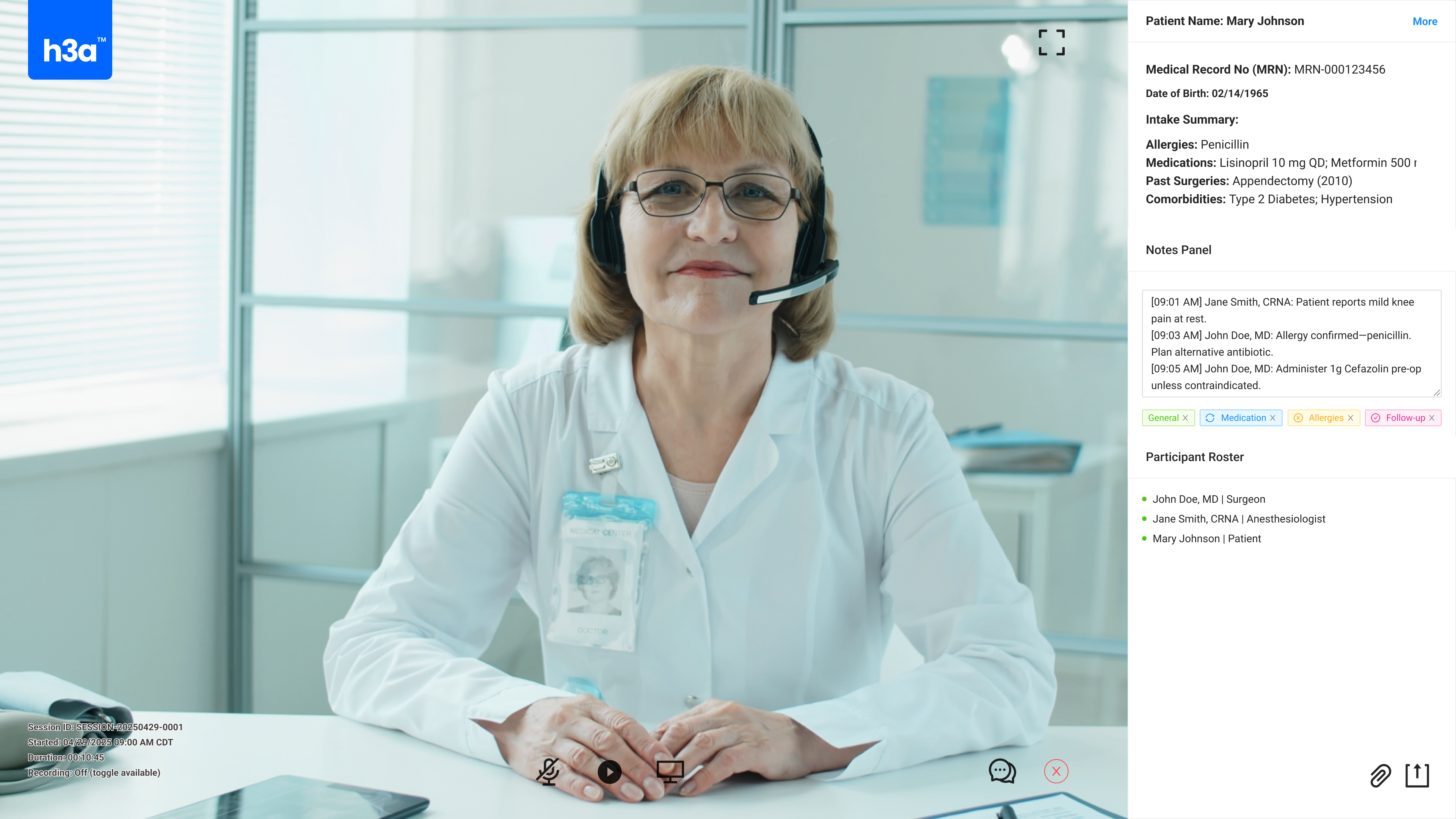
Patient video, medical record, notes, and participant roster visible simultaneously. Click to enlarge.
07 The Billing Integration
Every completed assessment had to produce a documented encounter meeting insurance billing standards. This wasn't an afterthought - it was a core design constraint that shaped the entire encounter structure.
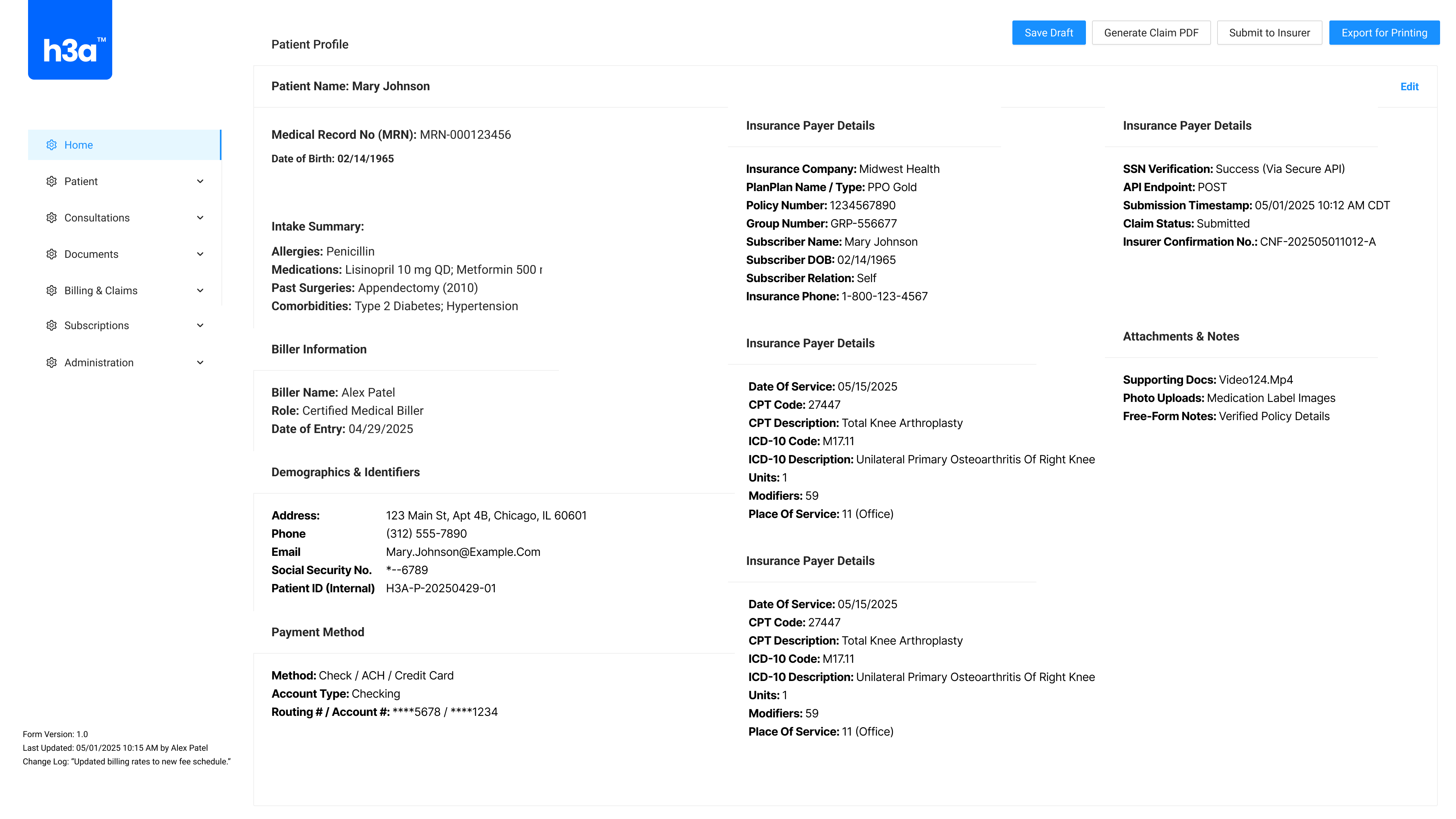
Encounter documentation was structured to meet billing codes. Video consultations were logged with clinical detail sufficient for reimbursement. Questionnaire completions were matched to the same documentation standard as in-person assessments. The platform didn't just improve communication - it created a new billable service line.
Assessment to Billing Flow
01
Patient completes assessment
02
Clinical record auto-generated
03
Meets billing code requirements
04
Submitted to insurance
Patient Profile & Billing Administration
Patient intake, insurance details, CPT/ICD-10 codes, and claim status in one view. Click to enlarge.
08 The Results
52%
Increase in pre-surgery patient participation
Decreased
Labor at patient arrival with pre-populated data
Billable
Insurance-billable encounters from day one
Patients who previously had no way to participate in pre-surgical assessment now had two paths to care, matched to their capabilities. The platform didn't just digitize an existing process - it reached populations that the existing process had structurally excluded.
Skills Demonstrated
Enterprise UX Healthcare/HIPAA Accessibility Design User Research Clinical Workflow Design Business Strategy & ROI Thinking Multi-Stakeholder Communication Plain Language Design09 What Didn't Work
Not everything landed the first time. Some of the hardest lessons came from designs that were technically sound but practically wrong.
First questionnaire designs were too long. I tried to capture everything in the initial version. Clinicians helped me prioritize - cut the nice-to-haves, keep the questions that directly impacted anesthesia decisions. Shorter questionnaire, higher completion rate.
Video call reliability was outside my control but inside my responsibility. Network quality, device compatibility, browser support - all variables I couldn't control but patients would blame the product for. I designed graceful degradation, auto-reconnect flows, and fallback to text when video failed.
Caregiver-mediated interactions were underestimated. Many patients had a family member or aide completing the assessment on their behalf. Consent flow, question framing, and identity verification all needed adjustment post-deployment to handle this pattern properly.
Iteration Timeline - Key Pivots
Early 2019
Questionnaire too long
Prioritized with clinicians. Cut non-critical questions. Completion rate improved significantly after shortening.
Mid 2019
Video reliability issues
Designed graceful degradation and auto-reconnect. Added text fallback when video failed. Patient trust maintained.
Late 2019
Caregiver mediation gap
Rebuilt consent flow for proxy completion. Added identity verification layer and caregiver-specific question framing.
10 What I Learned
Accessibility isn't a checklist - it's the product. The entire product existed because standard interfaces excluded people who needed care most. WCAG compliance was necessary but insufficient. Real accessibility meant designing for patients with Parkinson's trying to tap a button, for dementia patients whose caregiver was answering on their behalf, for stroke recovery patients who could speak but not read. The accessibility was the value proposition.
The business model is a design constraint. Insurance billing requirements shaped design decisions as much as user needs did. The encounter structure, the documentation format, the timing of data capture - all of it had to satisfy billing codes or the product had no revenue model. Understanding that constraint early meant designing with it, not against it.
Designing for impairment means designing for reality. Design for the worst-case version of every user, not the best-case. If the interface works for a patient with tremors, impaired vision, and limited English - it works for everyone. That framing changed every design decision from "what's the ideal interaction" to "what's the most forgiving interaction."
Key Insight
When accessibility is the value proposition, not a compliance requirement, it changes how you prioritize every design decision. The patients who were hardest to reach were the reason the product existed - not an edge case to handle later.
Accessibility was the value proposition, not a compliance requirement.
11 Artifacts Index
For serious evaluators who want to go deeper:
Tabari Seward
Product Designer specializing in enterprise healthcare, accessibility-first design, and reaching the hardest-to-serve user populations. Turning complex clinical workflows into tools that include everyone.